Showing posts with label fix. Show all posts

Tuesday, September 15, 2015

PC Games No sound FIX

I am sure you are here today out of share frustration as you have installed a new PC game only to have the sound not work or work only partially. This no sound issue can occur in any Game and happens either at a point in Games or at the very start, this includes in intro video sequences as well.

You may loose audio or sound totally or the Game starts with Audio and then it cuts out. In some cases you even have background sound but no dialogue or you cannot hear what characters are saying.I have personally seen this issue allot of times so let me assist you with a relatively easy fix for this issue for Windows users.

How to Fix No sound Issues in Games?

PC Games No sound FIX


To fix such a issue you will need to:

1. Go to your computers Audio control Manager such as Realtek or another brand based on your computer.
2. Under speaker configuration set the mode to Stereo, and make sure that the front left and right speakers are being used.
3. Go back to your Game and this will most likely bring back the Audio to full working condition.

As an alternative you can do the same thing by right clicking on volume control and going to Playback devices. Then selecting your speakers with the green tick and selecting configure and then selecting stereo and front left and right from the next screen and finishing the setup which will give you the same effects as above of restoring your Games Audio.

This will not work in all cases but in most cases where you are having issues in a PC Game you should try this to actually get your Audio problems fixed.

If you have found that this has worked for a particular Game please share the name of the Game in the comments to let other users know to save them valuable time in fixing such an issue.

Friday, May 1, 2015

Graphics Card Artifacts Fix

If you have a Graphics card and you decide to hold unto it for a very long time one of two things will happen eventually and that is either the card will totally die on you or it will start to develop issues such as Graphics card Artifacts.

 Graphics Card Artifacts

These artifacts are so named because they are strange pixilations that appear on screen which makes using your computer impossible. Also your graphics drivers may also randomly crash and recover. The issue happens because of an unstable Video cards that's showing its age. It should also be noted that the issue of Video card Artifacts may occur with Video cards that are overclocked and that have become unstable because of settings that the card cannot run at a stable state.

How to Fix  Graphics Card Artifacts?


Well the truth is a bitter one, so here it is: you will need to change your video card very soon and any solution offered here will only be a temporary remedy so you would do well to use the time and get a new and affordable video card.

1. You can try upping the voltage on the card, this has know to make unstable cards stable once more.You can achieve this by your GPU's management software.
2. If you are overclocked return to defaults settings and you will be good once more.
3. Try changing the thermal compound or increasing the GPU fan speed to help with cooling.
4. Since the card is already dying you can attempt to reflow the solder on the card by mending the broken path ways by baking the card, some users have reported they were able to revive their cards with this crazy method. I recommend however that you try achieving this with a heat gun as you can control temperatures better.
5. If you are using a motherboard with the discrete on board graphics and not a video card the motherboard might be getting old and faulty.
6. Try updating your graphics card drivers, a unstable driver can cause all sorts of weird effects if you are lucky this might be the issue. 

I have personally seen the same issue arise in a three year old video card that I own and these are the actions that I have found to work best. I had to eventually replace the video card but this may be enough to buy you some time in between waiting for the new card to arrive.


Tuesday, July 22, 2014

My laptop turns on black screen

Hey there guys and welcome to another one of my: Do it Yourself fixes where I look at common PC issue and teach you how to solve the problem in simple and easy to follow steps. One such problem is your Laptop turns on black screen then nothing and your device is rendered almost useless.

So lets looks at the issue and possible solutions to the problem to have your beloved laptop up and running again:
laptop turns on black screen
My laptop turns on black screen


Problem:  laptop turns on black screen

Symptoms: The symptoms of this problem may include the device display shows a black screen and the internal fans are still running. The power led and hard drive activity led may or may not flash as the device seems to be powered on but nothing on the display.

Causes: There are two (2) possible causes of this problem and slight variations could mean that its one or the other causing the laptop to turn on to a black screen:

1. A faulty stick of RAM is preventing the laptop from booting successfully, it tries to boot but fails but instead of a outright failure it  manages to boot to a black screen.

2. The second cause which is more unlikely may be caused by the LED back light of the display going out due to a faulty or a dead inverter that powers the monitor.

Solution:


Case 1: Faulty RAM

In case one (1) which is usually the culprit you will have to find and replace the faulty RAM stick. I have seen this issue with desktops and Laptops although it quite often happens more in laptops.

Luckily most modern Laptops have at least two (2) sticks of RAM and chances are only one is faulty and the laptop can run on one just fine until the replacement arrives or you could borrow a stick from another device to use for testing.

You are going to want to open the back panel and access the RAM this should be easy and accessible by a easy to remove back panel.Simply remove the panel and remove both stick of RAM clean the slots with compressed air or by blowing into the slots (Dust May cause RAM to stop working).

Clean the ram sticks and put back only one stick in Slot 1 or A and try booting, do the same with the second stick of RAM until you find the one that is causing the device not to boot. Once you have found it simply close up the laptop with the functional stick. You should now be good to go, you may purchase a replacement stick of RAM later.

Case 2. Damaged Inverter

To figure out if the monitors inverter is out or faulty, when the device powers up to the black screen carefully tilt and look on the screen very carefully to see if you can see any windows icons that are slightly visible, you can also use the aid of a flash light. If you hear windows boot and you can see slight menus and windows elements faintly in the background the inverter is blown.

In this case you will have to open the screen of the laptop and remove the faulty inverter, then match its make and model and order a new one and replace the damaged inverter. They are relatively cheap and not too difficult to replace.

I hope that this tutorial has helped you in fixing the Issue of your laptop turning on to a black screen today. If your problem is slightly different or you have a question feel free to use the comments and I will get back to you as soon as possible.

Monday, October 7, 2013

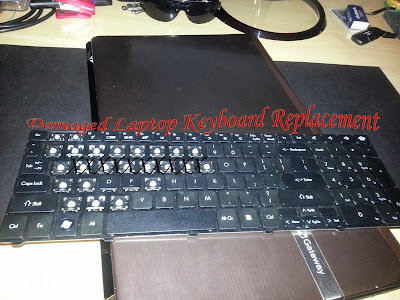
How to Fix or replace a damaged Laptop Keyboard?

Easy keyboard replacement
Easy Laptop keyboard Replacement

I often repair computers that the keyboards have been damaged and in one case I had a friend damage the keyboard and then in the space of two months i was at it again and replacing the keyboard for him a second time. Seeing that I have done this so many times I assume that others might be in a bind where they might need to replace or fix their keyboards because of damage.
So follow me as i show you how easy it is to actually find and replace a keyboard and be up and running again. This will only take approximately 15 minutes if you have done repair on laptops before and about 30 minutes or so if you are not familiar with the procedure. This will also work on any laptop and not only the Gateway NV53A used to demonstrate, the procedure might be a bit different but the underlining principles are the same.

Wednesday, September 18, 2013

How to unlock your Samsung Galaxy after Too many pattern Attempts or Forgotten Password.


android lockout fix
Samsung Galaxy Lockout!
So you finally did it, you locked yourself out of your Samsung Galaxy. You knew you should have used a simple pattern or a password you could remember easily. So what do you do now?, nothing works and you need to use your phone again. The worst thing is you did not associate a Google account at the first sign in and that option of regaining access to your device has failed.
Well you have come to the right place we have the solution you need.

Sunday, September 1, 2013

Pinterest Verification Fix For Blogger & How to add your blog link.


Pinterest Verification Fix blogger
Pinterest Verification Error.

If you are here then I can safely assume that you tried to sign up for Pinterest and to Verify your Blogger blog and you followed the instructions given on Pinterest to the "T", however you realized that you could not get your blog to verify by using the Meta Tag verification option which is the only method that will work for Blogger. You placed the given Meta tag from Pinterest after the <head> tag and got the error as the pic above. You soon exhausted your tries and was given a time out to try again later error.  Does that sound like you? well then ladies and gents read on to find the solution to this problem or if you are signing up for the first time we have included instructions for you as well.

Monday, August 12, 2013

How to Manually Eject a stuck CD or DVD from A Stuck Drive.

Stuck Drive Fix
Jammed CD or DVD drive Manual Eject

It finally happened your CD or DVD is stuck in the computer and you cant get it out, it could have been a power cut and you need the CD or DVD in the DVD drive now, or maybe the Drive is your favorite hiding place for your stash or the drives just malfunctioning. OK be calm and take a breather as we have the solution for you right here. To fix the Issue all you will need is a paper clip or a similar thin piece of firm metal or other material that similar in diameter.

Saturday, August 10, 2013

How to make a letterbox Movie into a full screen without things looking stretched out.

Letter box fix
Letterbox  Format of Movies with black  horizontal edges

So you just got that new DVD and placed it into the DVD drive of your computer and started to play the video only to find that you are stuck with a awful letterbox format that's unbearable. Wouldn't it be so much fun if it could be played at full screen without the characters looking all stretched out?. Well today I will show you readers how to adjust your videos so they look as natural as if they were shot in: glorious full screen without the limitations of the letterbox that Hollywood insist on still using on retail DVD or digital video due to differences between theater screens and your TV set. They wont go the extra mile some times, but thanks to technology we will:

Monday, July 22, 2013

Repair that broken Phone Charger and save yourself some Cash and Headaches

Recently My girlfriend had to revert to her old phone because her new cell's charger was acting up and the phone would not power on, based on her description my initial interpretation was that the unit was broken. She wanted to take it back to the store, but the receipt was no where to be found, so the new phone was just sitting there, unable to do anything or even to go back to the store for a replacement.
On observing the unit I came to realize the phone was solid, but the charger was damaged so I went to work  and in ten (10) minutes the phone was fully functional again.
 So what will you need to fix a broken phone charger?, well readers if you do not have these already you will need the items listed below.

Phone Plugged in and charging after Fix

Wednesday, July 17, 2013

How to switch Audio devices in windows 8

Switching Audio output devices
switching audio devices
Switching Audio Devices

So you have decided to use your PC as an alternative source of audio output for a new set of speakers, a TV, or home entertainment system but you have now come to realize that while you do know where you want the audio to play windows has not the slightest idea and switching between audio devices in windows is a pain.
So to jump to it, in order to switch windows audio streams you need to:

Sunday, July 14, 2013

How to fix any video Playback Issue on your computer 100% guaranteed Fix

My YouTube Video are not playing correctly or I cant get a Video  file to play

Video come up Blank with or without audio

So you are on YouTube and your video wont play or buffer correctly, you pop over to your favorite video streaming website only to find that the audio plays but no video. Your friend send you a video file you double click on the file but it refuses to play, what do you do?

Friday, July 5, 2013

Fixing HDMI Problem blurry and out of focus Monitor

Fixing HDMI Problem On a Blurry and Out of Focus Monitor

fix blurry monitor
The Picture on the monitor itself will seem blurred and bleached out and out of focus (Hard to show in Pics).

Today's fix is a classic and was one of my first major videos on YouTube that I created to solve a serious issue that I had found. When my monitor was connected by HDMI I noticed the screen was all blurry and out of the range of the monitor, while when on VGA it was beautiful. Stumped by the issue I was at it all night much to the amusement of my girlfriend at the time. I finally solved it and was beside my self with joy. I later had a crazy notion to do a video on it on YouTube, little unbeknownst to me at the time that this video would be a hit, in its own right. I made the video and soon checked my inbox and I was getting thank you's from all over the world. The first version was done a few years ago and the second refreshed version much recently, here are both videos and the written version for those who might be having the same Issue.
 PS. I am still getting hits and thank yous' from the video: